
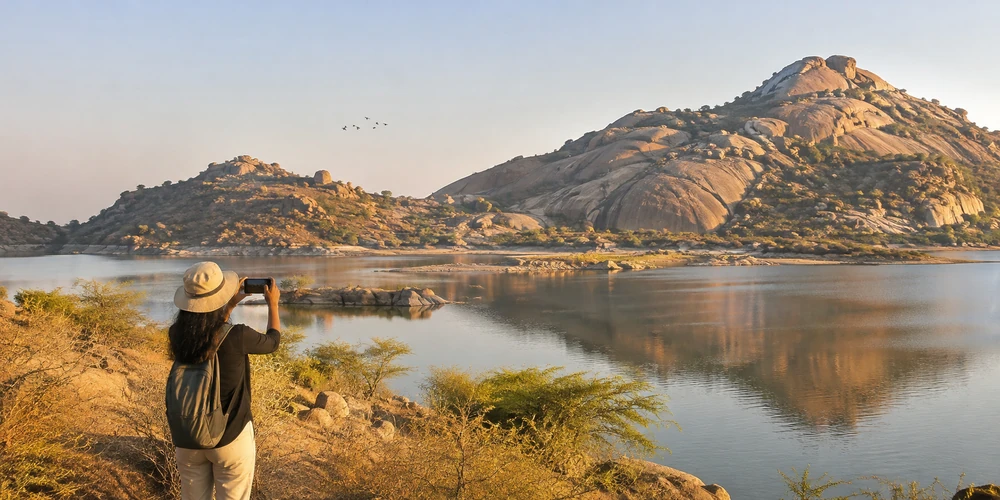
You do not need a professional camera to bring home memorable photographs of Jawai. A smartphone can capture the region’s sculpted granite hills, open skies, reservoir views and quiet travel moments beautifully when you pay attention to light, composition and timing. The biggest advantage is that a phone is light, easy to carry and ready whenever a scene catches your eye.
Jawai is more than a backdrop for leopard photographs. Its landscape changes with the hour and season: rock formations catch warm light, the water at Jawai Bandh reflects the sky, birds move between wetland and scrub habitats, and village roads reveal everyday rural life. This guide explains how to photograph these scenes with a smartphone while keeping wildlife, residents and your own safety in mind.
Why Jawai works well for smartphone photography
The region offers a variety of subjects that do not always require specialist equipment. Wide views of granite outcrops and the reservoir suit a phone’s main or ultra-wide camera. Textures in the rocks, dry grasses, reflections and changing cloud patterns make strong detail photographs. A phone is also useful for documenting the small moments around a trip, such as the changing colour of the hills or the quiet atmosphere before sunset.
Wildlife photography is different. A smartphone’s digital zoom has limits, especially when an animal is far away. Enjoy the sighting first, use binoculars if available, and take a photograph only when it can be done from the vehicle or another permitted safe place without disturbing the animal.
Choose the right time for better light
Early morning
Early morning often gives softer light and longer shadows that bring out the shape of Jawai’s granite formations. The air may feel cooler, and the landscape can appear calm before the day becomes busy. If you are photographing birds, the first part of the day can also be a useful time to observe activity around suitable water edges. Stay at permitted viewing points and avoid approaching birds to fill the frame.
Late afternoon and sunset
As the sun gets lower, warm light can add depth to the rocks and create attractive reflections on the reservoir. Try photographing the same view more than once as the light changes. A scene that looks ordinary in harsh midday sun may become much more interesting when the light arrives from the side.
Midday and changing weather
Strong overhead sunlight can create bright highlights and dark shadows. If you must photograph during this period, look for close-up textures, shaded details or compositions with clear shapes. During the monsoon, clouds and fresh vegetation can change the mood of the landscape, but wet rocks and uneven ground can be slippery. Do not climb or cross unsafe terrain to reach a viewpoint.
Set up your smartphone before you start
Clean the camera lens with a soft cloth. A fingerprint can make bright skies and water look hazy. Check that your phone has enough storage and battery, and switch off unnecessary camera filters if you want natural colours. Use the standard photo mode first; modern phones can handle many everyday scenes without complicated settings.
Turn on the grid if your camera offers it. The lines help you keep the horizon level and place important elements more deliberately. Tap the screen to focus on the subject. If the sky is very bright, slightly lower the exposure so that the highlights do not become a blank white area. You can usually adjust brightness by sliding the exposure control after tapping the screen.
Use composition to make landscapes more interesting
Include foreground, middle ground and background
A photograph of only distant hills can look flat. Add a safe foreground element such as a natural rock, a patch of grass or a tree, then let the hills and sky form the layers behind it. This gives the viewer a sense of depth. Do not step onto unstable rocks or private land just to create a foreground.
Keep the horizon straight
When photographing Jawai Bandh or a wide landscape, check that the waterline or horizon is level. A slight tilt can make a calm scene feel unintentionally unbalanced. The grid on your phone is a simple way to check this while composing.
Try both wide and close compositions
Use the wide camera to show the relationship between the hills, water and sky. Then make a second photograph that focuses on one detail: the pattern of a boulder, a reflection, a branch against the light or the texture of the landscape. A small collection of varied images tells a richer story than several nearly identical wide shots.
Photographing Jawai Dam and water reflections
Water can create a natural mirror, especially when the surface is relatively calm. Frame the reflection with the shoreline or a granite hill so the photograph has a clear subject. Try placing the waterline around the middle of the frame, then take another version with more sky or more reflection to see which tells the story better.
Do not move close to the edge for a better angle. Reservoir banks can be uneven, soft or unexpectedly steep, and water conditions can change. Photograph from a safe, permitted location and follow local instructions. If birds or other wildlife are present, keep a respectful distance and avoid blocking their movement.
Can you photograph birds with a smartphone?
Yes, but set realistic expectations. Birds may be distant or move quickly, and heavy digital zoom can make the image grainy. Keep the phone steady, use the main camera where possible and take a short burst of photographs if your phone supports it. You may get a better result by photographing a bird in its habitat rather than trying to create a tight portrait.
Use binoculars to observe details that your phone cannot capture. Never approach a nest, chase a bird, play recorded calls or enter vegetation to get closer. The purpose of a wildlife photograph is not worth disturbing an animal or damaging its habitat.
Wildlife photography: keep the animal’s welfare first
Leopards and other wildlife in Jawai are wild animals. Their movement and visibility cannot be guaranteed, and a smartphone should never become a reason to ask a driver or guide to move closer, follow an animal or block its path. During a safari, remain seated in the vehicle and follow the tracker’s instructions. Keep your hands and phone secure, avoid sudden movements and do not use flash.
Sometimes the most meaningful photograph is a wider frame showing the animal as part of the rocky landscape. If the animal is too far away for a clear phone image, put the phone down and enjoy watching it. Do not share precise details of sensitive wildlife locations publicly if doing so could encourage crowds or disturbance.
Photographing village life with respect
Jawai is also a lived-in rural landscape. A photograph of a village lane, livestock moving along a track or a local market can add context to your travel story. However, residents are not props for holiday photographs. Ask a person directly before taking a close-up portrait or recording video, and accept a refusal without argument. A guide’s approval does not automatically mean every individual has agreed to be photographed.
Do not enter a home, courtyard, field or animal enclosure unless invited. Avoid photographing children without permission from their parent or guardian. Keep roads clear, give herders and livestock space, and do not ask anyone to repeat a daily activity for the camera. A respectful photograph begins with a respectful interaction.
Simple phone photography checklist for Jawai
- Clean the camera lens before heading out.
- Charge your phone and carry a power bank if needed.
- Use the grid to keep horizons straight.
- Photograph landscapes in softer morning or evening light when practical.
- Use the wide camera for scenery and the main camera for everyday subjects.
- Avoid excessive digital zoom and heavy filters.
- Keep a safe distance from water edges, wildlife and uneven rocks.
- Ask permission before photographing residents or private spaces.
- Back up your photographs when you have a reliable connection.
Make photographs that remember the whole of Jawai
A memorable Jawai photo story does not have to depend on a close-up wildlife sighting. The granite hills, reservoir, changing light, birdlife and everyday rural scenes all help describe the character of the region. A smartphone is enough to notice these details when you slow down, look carefully and work with the available light.
Most importantly, let the place come before the photograph. Stay on permitted routes, respect local residents, follow wildlife guidance and never put yourself or an animal at risk for a better frame. The best travel photographs are the ones you can look back on knowing that the moment was captured with care.
Frequently asked questions
Can I take good photographs in Jawai with a smartphone?
Yes. Smartphones are well suited to Jawai’s wide landscapes, granite textures, reservoir views and everyday travel scenes. Good light, a clean lens and thoughtful composition matter more than having expensive equipment.
What is the best time for smartphone photography in Jawai?
Early morning and late afternoon often provide softer light and longer shadows. Conditions vary by season and weather, so remain flexible rather than expecting the same light every day.
Can I photograph leopards with a mobile phone during a Jawai safari?
You may take a photograph from the vehicle when your guide says it is appropriate, but distance and lighting can limit phone image quality. Never ask the driver to approach or follow an animal for a closer picture.
Which phone camera setting is best for Jawai landscapes?
Start with the standard photo mode, keep the horizon level and use the wide camera for expansive views. Tap to focus and adjust exposure if the sky is too bright.
Is it okay to photograph Rabari people and village life?
Ask the individual for permission before taking close-up photographs or videos. Respect privacy, avoid entering private spaces without an invitation and accept a refusal immediately.
Do I need a tripod for smartphone photography in Jawai?
A tripod is not essential for most daytime landscapes. It can help in low light, but choose a stable, permitted location and never set it up where it blocks a path or brings you close to wildlife or unsafe water edges.